

联系我们
与泰克代表实时聊天。 工作时间:上午 9:00 - 下午 5:00(太平洋标准时间)。
致电我们
工作时间:上午9:00-下午5:00(太平洋标准时间)
下载
下载手册、产品技术资料、软件等:
反馈
Power Measurement Deskew & Calibration Fixture Instructions
This document is targeted to product users and explains operation and/or installation procedures.
此手册适用于:
TAP1500, TAP2500 0, TAP3500 0, TDP0500, TDP1000, TDP1500 0, P6243, P6245, P6247, P6248, P6251, TCP0150, TCP303, A6312, A6303, TAP4000, P5050B 0, TPP0250, TPP0500 0, TPP1000 0, TDP3500 0, TDP4000, P5200A, P5205A 0, P5210A 0, THDP0200, TMDP0200, THDP0100, TCP0030A, TCP0020, TCP2020, TCP202A, TCP312A, TCP305A
下载即代表您同意手册下载协议的条款和条件。
手册下载协议
注意:从本网站下载任何文档之前,请认真阅读以下条件和条款。 如果从泰克网站上下载手册,即表示您同意以下条件和条款:
当前支持的产品的手册:
泰克在此向泰克仪器的所有者授予权限和许可,可从此网站上下载和复制手册供其自己内部或个人使用。 除非经过泰克公司书面专门授权,当前支持产品的手册不得复制用于发行。
泰克手册可能会被更新以反映产品制造寿命过程中所做的更改。 因此,任何给定产品都可能存在多个手册版本。 请小心使用,确保为特定的产品序列号获取正确的手册版本。
不再支持的产品的手册:
对于不再适于长期支持的测量产品,泰克无法提供手册。 泰克特此向他人授予权限和许可,对于 (a) 拥有泰克部件号,并且 (b) 用于泰克不再支持的测量产品,可以复制和发行泰克任何测量产品手册的副本,包括用户手册、操作手册、维修手册等等。
泰克手册可能会被更新以反映产品制造寿命过程中所做的更改。 因此,任何给定产品都可能存在多个手册版本。 请小心使用,确保为特定的产品序列号获取正确的手册版本。
此授权和许可不适用于泰克仍在提供的任何手册和其他出版物,或者用于视频制作产品或彩色打印机产品的任何手册和其他出版物。
免责条款:
对于非泰克提供的、或者按照上述授权和许可复制或发行的任何测量产品手册或其他出版物,泰克对于其中所含任何信息、文字、图形、原理图、部件清单或其他材料的准确性和完整性不做保证。
泰克可能会随时更改本网站或其产品的内容而不事先通知。
责任限制:
对于使用按照上述授权和许可制作或发行的任何测量产品手册或其他出版物所造成的任何损害,包括但不限于利润损失、业务中断或侵犯知识产权,泰克不应承担责任。
Read Online
Overview
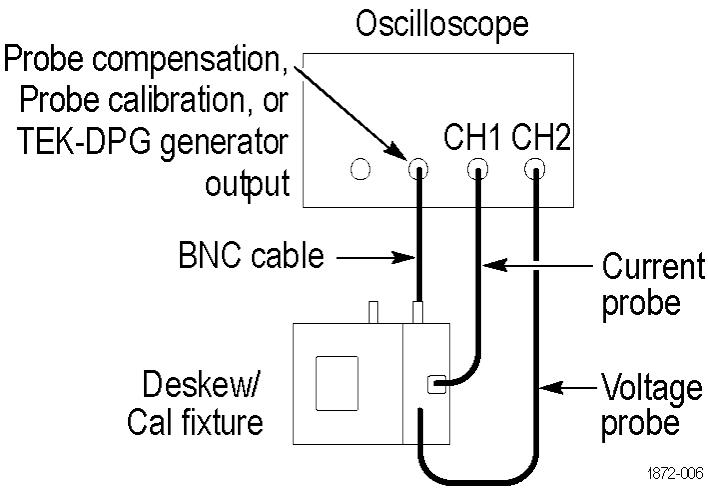
This fixture converts the oscilloscope PROBE COMPENSATION output (Probe Calibration on DPO7000C Series) or the TEK-DPG pulse generator output into a set of test point connections. These connections provide you with a convenient way to compensate for timing differences between voltage and current probes.
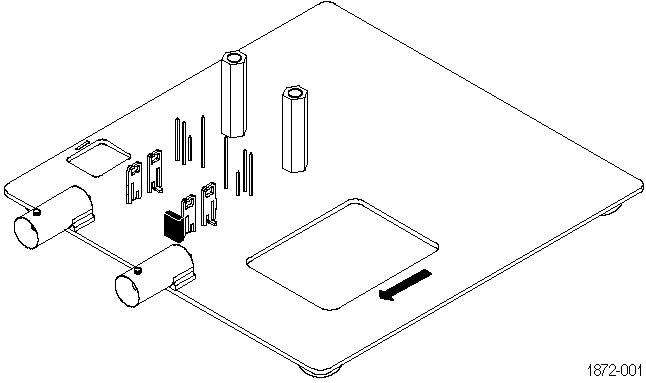
You can also optimize the instrument gain and offset accuracy at the probe tips for both voltage and current probes. Use the table as a guide to connect a variety of Tektronix voltage and current probes together on the fixture.
Connecting to the instrument
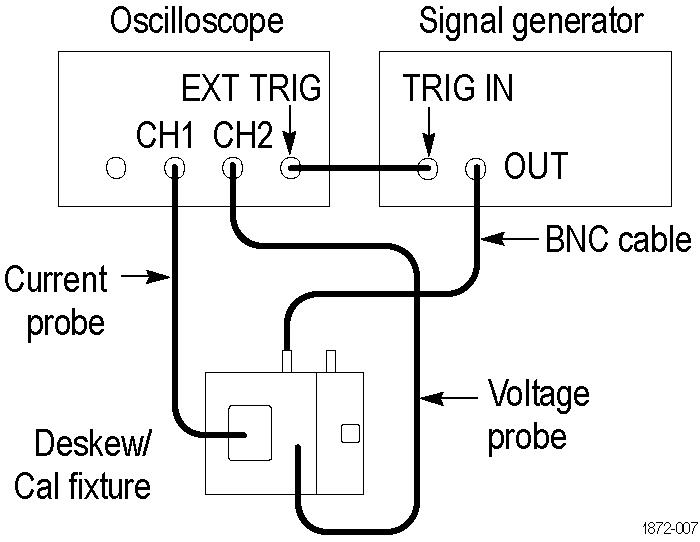
The fixture has two BNC inputs, Port A and Port B. The jaw size of the current probes and the operation that you want to perform determine which input to use. Use the included BNC cable to connect the fixture input to the Probe Calibration output of your DPO7000C instrument or to an external generator. Other TekVPI oscilloscope models, including the MDO3000 and MDO4000C series, 3 Series MDO and 4/5/6 Series B MSO, require the TEK-DPG pulse generator or an external generator as the signal source.
 | CAUTION:The maximum allowable voltage applied to either input is 8 V RMS. Voltages in excess of 8 V RMS can damage the fixture. |
Passive voltage probes fixture input guide
The following table supports P6139B, P5050B, TPP0250 TPP0500B, TPP1000, and other 10X passive probes. Not all probes are usable with all instruments. Gain and offset calibration is generally not needed for these probes.
| Operation | Input |
|---|---|
| Low frequency compensation | B |
| Gain and offset calibration (remove jumper from fixture to perform this operation) | B |
| Compensate timing with respect to current probes | A/B (use Port A for small current probes, Port B for large) |
Active voltage probes fixture input guide
The following table supports TAP1500, TAP2500, TAP3500, TAP4000, TDP0500, TDP1000, TDP1500, TDP3500, TDP4000, P6243, P6245, P6247, P6248, and P6251 probes. Not all probes are usable with all instruments.
| Operation | Input |
|---|---|
| Gain and offset calibration (remove jumper from fixture to perform this operation) | B |
| Compensate timing with respect to current probes | A/B (use Port A for small current probes, Port B for large) |
High voltage probes fixture input guide
The following table supports P5200A, P5205A, P5210A (requires external signal source), THDP0200, TMDP0200, and THDP0100 probes. Not all probes are usable with all instruments.
| Operation | Input |
|---|---|
| Gain and offset calibration (remove jumper from fixture to perform this operation) | B |
| Compensate timing with respect to current probes | A/B (use Port A for small current probes, Port B for large) |
Current probes fixture input A guide
The following table supports TCP0030A, TCP0020, TCP2020, TCP202A, TCP312A, and TCP305A probes. Not all probes are usable with all instruments.
| Operation | Input |
|---|---|
| Gain and offset calibration | A |
| Compensate timing with respect to current probes | A |
Current probes fixture input B guide
The following table supports TCP303 and TCP0150 probes. Not all probes are usable with all instruments.
| Operation | Input |
|---|---|
| Gain and offset calibration | B |
| Compensate timing with respect to current probes | B |
Connecting probes
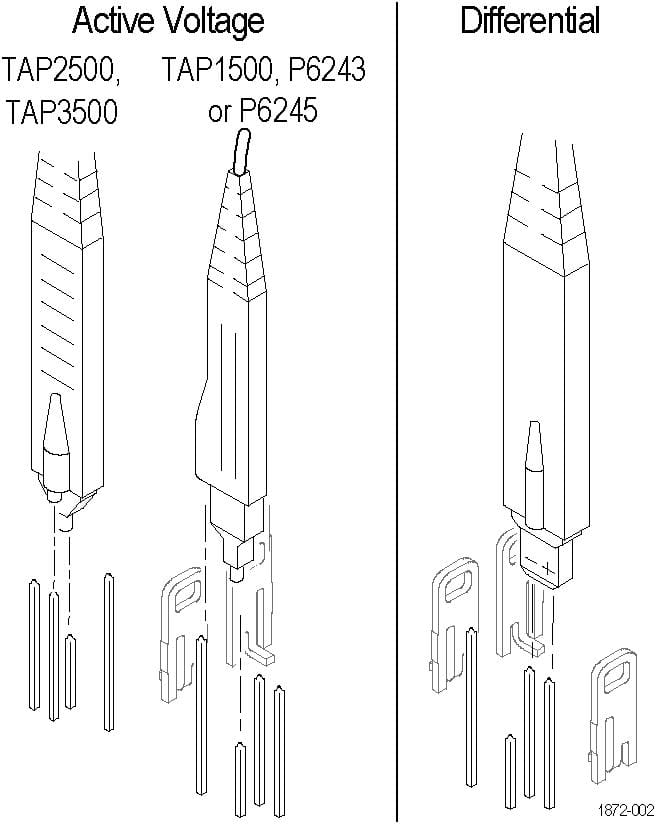
The following diagrams show how to attach each type of probe tip to the fixture. Refer to the ground symbols on the fixture to establish the correct polarity.
| WARNING:To avoid personal injury, use care while connecting probe tips to the square pins on the fixture. The ends of the square pins are sharp. |
Active Voltage or Differential probes
For Active Voltage probes (TAP1500, TAP2500, TAP3500, TAP4000, P6243, or P6245), connect the probe tip to the short pin and the probe ground to the long pin as shown.
For Differential probes (TDP0500, TDP4000, TDP3500, TDP1000, TDP1500, P6247, P6248, or P6251), connect the probe + input to the signal pin and the probe – input to the ground pin as shown. There is no connection to the probe ground input.
Passive Voltage or High Voltage probes
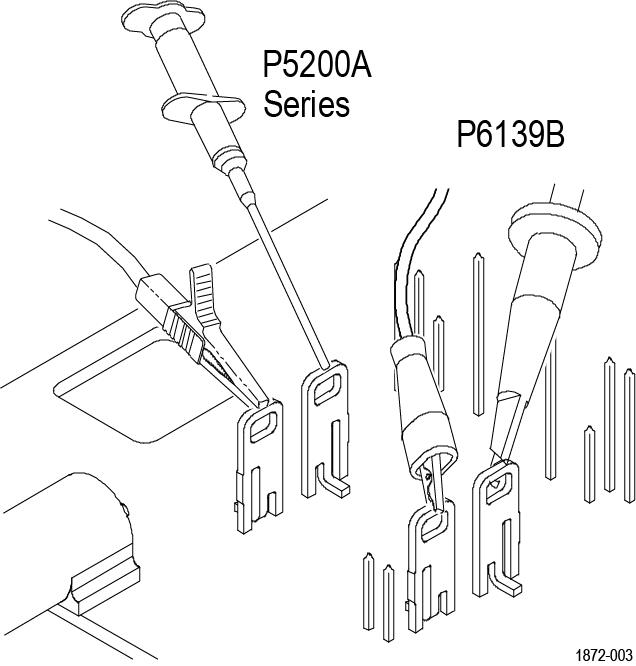
For P6139B or P5200 Series probes, connect the probe tip and the ground lead to the two terminals as shown.
Current probes
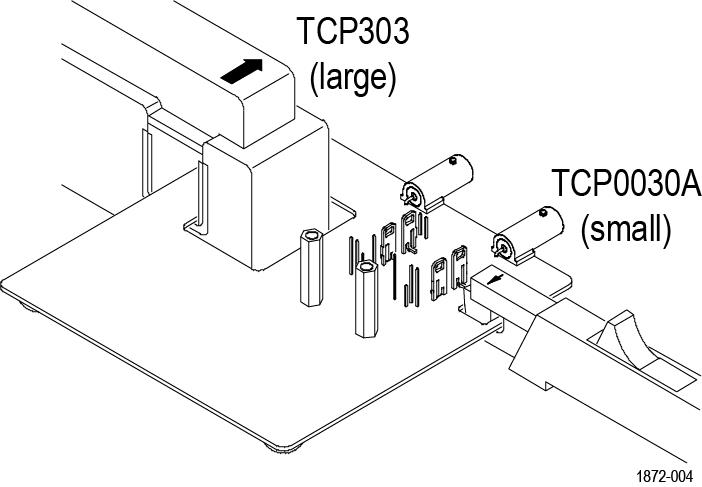
For TCP0030A, TCP0020, TCP2020, TCP202A, TCP312A, TCP305A, TCP0150, and TCP303 probes, connect the current probe around the current loop as shown. Be sure to align the polarity arrows on the current probe and the fixture, and make sure the current probe slider is closed and locked.
Using the fixture
Perform the following steps to use the fixture. For best results, warm up the equipment for 20 minutes before performing these functions.
Optimize Gain and Offset Accuracy
Not all oscilloscopes support this function.
- Connect the Port A or Port B side of the fixture to the instrument, depending on the probe type. If you are optimizing the gain and offset accuracy for a voltage probe on Port B, remember to remove the small jumper over the two pins on the fixture.
- Connect the probe to the fixture as described in Connecting Probes.
- Initiate the Calibrate Probe routine.
- When the routine is finished, remove the connections and replace the small jumper across the two pins on the fixture. Leave the jumper installed for all other functions.
Compensate probe timing (Deskew)
- Connect the Port A or Port B side of the fixture to the instrument, depending on the probe type.
- Connect the probes to the fixture.
- Display all channels that you want to deskew.
- Push the AUTOSET button on the instrument front panel.
- Adjust vertical SCALE and POSITION for each channel so that the signals overlap and are centered on-screen (with active probes, adjusting offset may be required).
- Adjust horizontal POSITION so that a triggered rising edge is at center screen.
- Adjust horizontal SCALE so that the differences in the channel delays are clearly visible.
- Adjust horizontal POSITION again so that the first rising edge is exactly at center screen. The fastest probe is connected to this channel. The fastest probe is probably the one with the shortest cable or the highest bandwidth.
- Touch the VERT button or use the Vertical menu to display the vertical control window.
- Touch the Probe Deskew button to display the channel-deskew control window.
- Select one of the slower channels. If possible, perform the next step at a signal amplitude within the same attenuator range (vertical scale) as your planned signal measurements. Any change to the vertical scale after deskew is complete may introduce a new attenuation level (you can generally hear attenuator settings change) and therefore a slightly different signal path. This different path may cause up to a 200 ps variation in timing accuracy between channels.
- Adjust the deskew time for that channel so that the signal aligns with that of the fastest channel.
- Repeat steps 11 and 12 for each additional channel that you want to deskew.
- Remove the connections.
Schematics
The schematic diagrams that follow show typical connections for both small and large style current probes.
| CAUTION:The maximum allowable voltage applied to either fixture input (Port A or Port B) is 8 V RMS. Voltages in excess of 8 V RMS may damage the fixture. |
Safety summary
To avoid potential hazards, use this product only as specified.
To avoid fire or personal injury, do not operate in wet/damp conditions.
Keep product surfaces clean and dry.
Refer to your probe manual for additional safety information.
Terms in this manual and on the product
These terms may appear in this manual:
| WARNING:Warning statements identify conditions or practices that could result in injury or loss of life. |
| CAUTION:Caution statements identify conditions or practices that could result in damage to this product or other property. |
These terms may appear on the product:
- DANGER indicates an injury hazard immediately accessible as you read the marking.
- WARNING indicates an injury hazard not immediately accessible as you read the marking.
- CAUTION indicates a hazard to property including the product.